

A Google Business Profile that is just claimed and filled in is not an optimized profile. It is a placeholder. To properly optimize Google Business Profile listings and turn them into consistent lead generation assets, every element has to be configured with intention, maintained actively, and treated as a living extension of the business rather than a one-time setup task.
Most local businesses fall somewhere between two extremes: they have an incomplete profile with missing hours, a generic description, and no photos, or they have a complete profile that has not been touched in two years. Both situations cost calls. Neither is hard to fix.
This guide covers what a fully optimized profile looks like, what drives calls specifically rather than just impressions, and how to maintain a profile that compounds its advantage over time.
Why Most Google Business Profiles Underperform
Let’s be direct about the gap between what most businesses have and what the profile can do.
The Google Business Profile is the most visible touchpoint between your business and a local searcher. When someone searches for your service in your city, the profile appears in the Map Pack before any website or organic listing. The information on that profile, the category, the hours, the photos, the reviews, the response rate, is what the searcher uses to decide whether to click, call, or scroll past.
A profile that is static and incomplete sends signals in both directions: to Google about your relevance and activity, and to the searcher about what kind of business you are. Both matter for calls.

Here is what actually happens when a profile is treated as a setup task rather than an ongoing asset. The initial completeness score looks fine. But over time, hours drift out of date, the description never gets updated when services change, photos stay the same, reviews accumulate without responses, and competitors who are actively managing their profiles start appearing ahead of yours in the Map Pack.
We have seen this across dozens of local SEO audits, from home services businesses in Houston to law firms in Chicago to healthcare providers in San Diego. The businesses getting the most calls from search are almost never the ones with the most complete initial setup. They are the ones maintaining their profiles consistently.
Optimize Google Business Profile: The Full Framework
Getting a profile to perform at its ceiling requires deliberate attention to every element that Google and searchers evaluate. Here is the complete framework.
Category Selection: The Foundation of Relevance
Category selection is the single most important configuration decision in the entire profile. The primary category tells Google what type of business this is and which searches it should appear for. Choosing the wrong primary category, or defaulting to a generic one when a specific option exists, limits the searches the profile can be served for.
Every industry has multiple category options, and they carry different ranking implications. A general contractor should not just select “Contractor” when “General Contractor” and specific trade categories are available. A personal injury law firm should not default to “Law Firm” when “Personal Injury Attorney” is a specific category option. An HVAC company should use “HVAC Contractor” or “Air Conditioning Repair Service” rather than a generic contractor category.
Secondary categories are also available and should be used to reflect all relevant service types. A plumbing company that also does HVAC can list both plumbing and HVAC categories. Secondary categories expand the searches the profile appears for without conflicting with the primary category’s relevance signal.
The category selection is the relevance signal Google uses to match the profile to the right searches. Getting it right is the prerequisite for everything else.

Business Description: The Keyword Opportunity Most Businesses Miss
The business description is a 750-character field that most businesses fill with generic language about their values and history. This is a missed keyword and conversion opportunity.
The description should describe specifically what the business does, who it serves, what makes it worth choosing, and where it operates. Including the primary service type, the service area, and any meaningful differentiators gives Google additional relevance signal and gives the searcher the context they need to decide to call.
A plumber in Dallas whose description reads “Smith Plumbing has been serving the greater Dallas area since 2008, specializing in residential and commercial plumbing repair, drain cleaning, water heater installation, and emergency plumbing services” is telling both Google and the searcher something specific and useful. A description that says “We are a family-owned business dedicated to quality service and customer satisfaction” tells neither Google nor the searcher anything actionable.
The description is indexed and contributes to the profile’s relevance for keyword searches. Write it as you would write the meta description for a high-value service page.
Services Section: The Conversion Layer
The services section allows you to list every service your business provides with individual descriptions. It appears on the profile for searchers and is evaluated by Google for relevance matching.
For service businesses, filling out the services section comprehensively is the single highest-leverage optimization after category selection. Each service should have a specific name and a description that explains what it includes. A law firm listing “Estate Planning,” “Will Drafting,” “Trust Formation,” and “Probate Assistance” as separate services with individual descriptions ranks for more specific service searches than a law firm whose profile only lists the practice area name.
Service-area businesses should ensure their service area is accurately configured in the profile settings. A home services business serving a full metro area including suburbs should list all the cities and zip codes it actually serves, not just the city where the office is located.

Photos: The Conversion Signal Searchers Actually Read
Photos on a Google Business Profile serve two functions. They signal to Google that the profile is active and current, and they signal to prospective customers what kind of business they are dealing with.
A profile with no photos or photos from three years ago communicates nothing useful and loses clicks to profiles with recent, professional photography. A profile with consistent, current photos of the business exterior, the interior, the team, and the work product gives a searcher the visual confidence to call.
For local service businesses, adding photos of recent completed work is particularly effective because it shows the quality of the output rather than just the existence of the business. An HVAC company with 40 photos of recent installations competes very differently for conversions than one with three photos of the truck.
Update photos at least quarterly. Add photos of new work, team members, seasonal service offerings, and equipment. Google’s algorithm gives recency weight to photo engagement. Active photo profiles perform better in Map Pack rankings than static ones.
Review Acquisition and Response: The Compounding Authority Signal
Reviews are evaluated by Google on volume, recency, sentiment, and response rate. All four dimensions matter. A business that earned 80 reviews three years ago and has not received one since is losing Map Pack ground to competitors who are actively earning new reviews each month.
Build review acquisition into the post-service workflow. Send a direct text or email to the customer within 24 hours of job completion with a single-click link to the Google review form. Remove every step of friction from the process. The easier you make it, the more reviews you will get.
Respond to every review. Positive reviews warrant a brief, genuine thank-you. Negative reviews warrant a professional, empathetic response that acknowledges the concern and offers a resolution path. How you handle a negative review is often more persuasive to prospective customers than a collection of five-star reviews with no engagement.

Google Posts: The Activity Signal Most Businesses Ignore
Google Posts are short updates published directly to the profile and visible to searchers in the knowledge panel. Most businesses never use them.
Posting weekly or biweekly updates about promotions, seasonal services, completed projects, or relevant business news signals to Google that the profile is actively managed. It also gives the searcher additional context about the business before they call or click.
Posts expire after a week for event posts and stay visible longer for standard posts. The goal is a consistent cadence, not perfection. Even two posts per month is meaningfully better than zero.
Understanding how the full profile configuration interacts with ranking signals is covered in the google-business-profile-affects-rankings guide. The broader set of local signals that determine Map Pack position, including citation consistency and review velocity, is covered in the local-seo-ranking-factors guide.
Common Google Business Profile Mistakes That Cost Calls
Leaving the service area misconfigured.
A service-area business that only lists its home city in the service area settings misses all the surrounding communities it actually serves. A plumber in Phoenix who serves Scottsdale, Tempe, and Mesa but has not listed those cities in the service area is invisible in Map Pack results for searches from those areas.
Not updating hours for holidays and special events
A business whose profile shows the wrong hours during a holiday period frustrates searchers and loses the call to a competitor with accurate information. Google surfaces special hours prompts before major holidays. Use them. Update hours proactively any time the schedule changes.
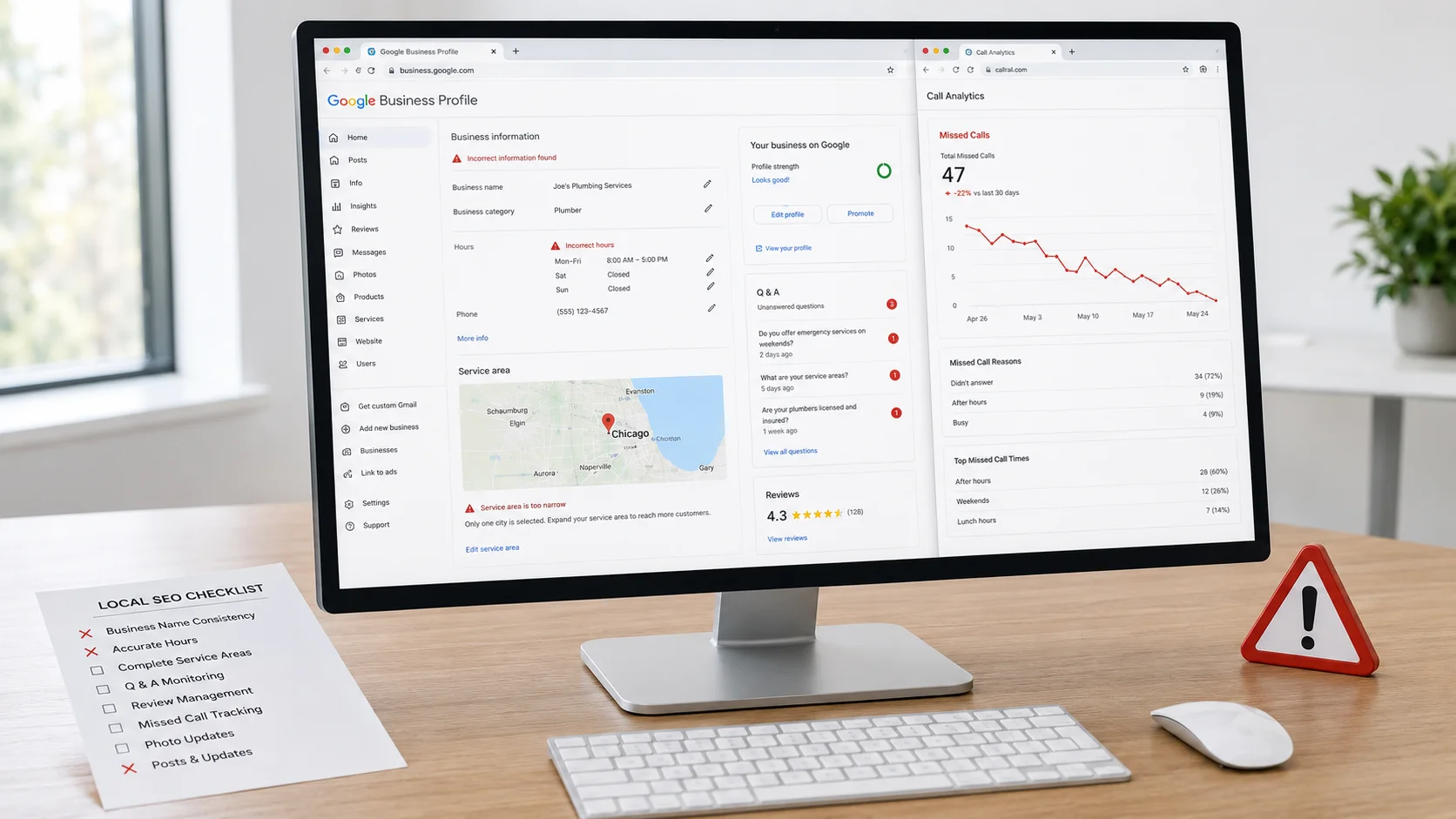
Never using the Questions and Answers section
The Q and A section is publicly visible and any Google user can post questions or answers. Without monitoring and responding, inaccurate answers from well-meaning but incorrect users can appear on your profile. Check the Q and A section weekly, answer any unanswered questions, and proactively add questions and authoritative answers for the things your customers most often ask before calling.
Treating reviews as a passive signal
Businesses that wait for reviews to come in organically consistently have fewer recent reviews than competitors who ask systematically. The ask rate makes the difference. A business with a two-step review request system, one text immediately after the job and one follow-up after 48 hours if no review has been left, earns two to four times more reviews than one that relies on customers to act spontaneously.
Not verifying and monitoring the profile for suggested edits
Google allows users to suggest edits to any business profile. These suggestions can change your address, hours, phone number, or other information. Without monitoring, you may not notice that your profile has been altered by a third party. Check the profile weekly and verify all current information.
FAQ: Optimize Your Google Business Profile
How often should I update my Google Business Profile?
At minimum, review and update the profile monthly. Update hours immediately when they change. Add new photos quarterly. Publish Google Posts at least twice per month. Respond to reviews within 24 hours. The more actively the profile is managed, the stronger the engagement signal it sends to Google.
Does Google Business Profile optimization affect Map Pack rankings?
Yes, significantly. The profile is the primary local ranking asset Google evaluates for Map Pack position, alongside citation consistency and prominence signals. Category selection, review signals, profile completeness, and engagement activity all feed directly into the local search algorithm. The profile is not just a conversion tool; it is an active ranking signal.
How many photos should a Google Business Profile have?
There is no minimum that guarantees results, but profiles with 50 or more photos consistently outperform those with fewer in terms of both engagement and ranking in competitive markets. Add photos regularly rather than all at once, since recent activity signals matter alongside volume.
What is the most important thing to fix first on an underperforming profile?
Category selection first, if it is incorrect or too generic. Then the business description if it is generic or thin. Then the service area if it does not match the actual service geography. Then reviews if acquisition has been passive. Addressing these four in order produces the most immediate impact on both rankings and call volume.
Does responding to reviews actually affect rankings?
Response rate is a relevance and engagement signal that Google factors into local rankings. Profiles with consistent, timely responses to reviews rank more reliably than profiles with ignored reviews. Beyond rankings, responses to negative reviews directly affect conversion: prospective customers read both the review and the response before deciding to call.
The Bottom Line
The businesses generating consistent calls from Google Search are not the ones with the most impressive listings. They are the ones treating the profile as an active, ongoing business asset rather than a setup task that was completed once and forgotten.
When you optimize Google Business Profile correctly and maintain it consistently, the profile compounds its advantage month over month. Each new review, each updated photo, each Google Post, and each resolved Q and A question adds to the signal Google uses to rank the profile and the confidence a searcher uses to decide to call.
That compounding is the difference between a profile that produces calls and one that produces impressions that go nowhere.
Want to know exactly what your Google Business Profile is missing and what it would take to generate more calls from local search?
If you want a strategy that actually fits your business, book a free strategy call. We will walk you through your current profile, identify the gaps, and show you what a fully optimized local presence looks like in your market. Visit our Local SEO Service Page to learn more about how we approach this work.