

Starting an eCommerce SEO campaign without an audit first is one of the most expensive mistakes an online store can make. An eCommerce SEO audit checklist is not just a preliminary step. It is the diagnostic that determines whether the campaign you are about to invest in has any chance of producing results, or whether it will be fighting a technical and structural foundation that cancels out every improvement made above it.
We audit eCommerce sites before every engagement, from mid-size apparel brands in Los Angeles to specialty retailers scaling out of Chicago. What consistently separates stores that compound organic revenue from those that spin their wheels despite real investment is not always the campaign strategy. It is what was missed in the audit before the campaign started.
Here is exactly what a proper eCommerce SEO audit covers and why each section matters.
Why eCommerce Sites Fail Audits That General Sites Pass
eCommerce SEO problems are structural, not just page-level. A content site with 200 pages has 200 potential issues to audit. An eCommerce store with 500 products, 20 categories, faceted navigation, and product variants can have 10,000 to 50,000 URL-level issues without any deliberate wrongdoing by the site owner.
The volume of potential problems scales with the catalog. Duplicate content is the most common. A product available in three colors and five sizes can generate 15 near-duplicate URLs, each one competing with the others and splitting whatever authority the product page earns. Multiply that across a catalog of 500 products and you have a significant structural problem that no amount of link building or content marketing will overcome until it is addressed.

The second eCommerce-specific problem is crawl budget waste. Category page filters, sort order parameters, and session IDs generate thousands of unique URLs that Google crawls repeatedly, spending time on low-value pages while high-priority category and product pages get crawled infrequently. This directly suppresses ranking velocity on the pages that drive revenue.
A proper eCommerce SEO audit checklist addresses both the general technical issues that affect any website and the specific structural problems that are unique to catalog-based sites.
The eCommerce SEO Audit Checklist: What Each Section Covers

Section 1: Crawlability and Index Health
The audit starts with understanding what Google can see and what it is actually choosing to index.
Pull the Google Search Console Index Coverage report and review the exclusion categories. Look specifically for:
- “Duplicate without user-selected canonical”: common on product variant pages and category filter URLs
- “Crawled, currently not indexed”: signals thin content or near-duplicate pages that Google deprioritizes
- “Discovered, currently not indexed” in high volumes: signals crawl budget constraints
Run a full crawl with Screaming Frog or Sitebulb. Map the total crawled URLs against the number of URLs you consider indexable. A site with 500 products and 5,000 crawled URLs has a structural problem. The gap between intended pages and crawled pages is where the wasted resources live.
Check the robots.txt file specifically. eCommerce platforms, particularly Shopify and WooCommerce, sometimes configure robots.txt in ways that block category URL variants or admin-adjacent pages that should not affect indexation but occasionally do.
Section 2: Duplicate Content and Canonical Structure
Duplicate content on eCommerce sites almost always comes from one of four sources:
- Product variant URLs (color, size, material creating separate indexable pages)
- Category filter and sort order parameters creating unique URLs for the same set of products
- Paginated category pages without self-referencing canonicals or proper pagination handling
- Product descriptions copied from manufacturer feeds, which appear on hundreds of other retailer sites
Audit for: canonical tags on all product and category pages, parameter handling configuration in Google Search Console, unique content on key product and category pages, and the gap between submitted sitemap URLs and indexed URLs.
For a detailed framework that covers both eCommerce-specific and general technical duplicate content handling, the technical seo audit checklist provides the complete category-by-category process.
Section 3: Category Page Optimization
Category pages are the highest-priority ranking targets on most eCommerce sites. They target broader, higher-volume keywords and serve as the entry point for the largest share of organic buyers. A properly audited category page should have:

- A unique, keyword-containing H1 that reflects the category’s primary search term
- Original introductory copy of at least 150 to 200 words that is visible above or below the product grid
- A unique, optimized title tag and meta description
- Internal links from the homepage and relevant related categories
- A canonical tag pointing to itself (not to a filter variant)
- Product schema on individual product cards where supported
Most eCommerce sites audit poorly on the original copy requirement. Category pages with no text content, or with text generated by a template that is nearly identical across categories, are treated by Google as thin pages regardless of how many products they contain.
Section 4: Product Page Optimization
Product pages need both technical precision and content differentiation. The audit at the product page level covers:
- Unique product descriptions, not manufacturer copy pasted from the supplier feed
- Optimized title tags that include the product name and a relevant modifier (color, size, use case) where appropriate
- Canonical tags correctly pointing to the primary variant for products with multiple URL-generating variants
- Product schema including price, availability, and AggregateRating where reviews are present
- Image alt tags that describe the specific product rather than a generic file name
- Out-of-stock handling: pages returning 200 status with alternatives shown rather than 404 errors that delete ranking history
The out-of-stock audit is particularly important for any store with seasonal products or inventory fluctuations. Every 404 on an out-of-stock product is a deleted ranking asset.
Section 5: Site Speed and Core Web Vitals
Speed on eCommerce sites is systematically worse than on content sites because of the rendering complexity involved: product imagery, dynamic pricing, inventory widgets, review aggregations, and third-party apps all load on product and category pages simultaneously.
The Core Web Vitals audit for eCommerce focuses on:
- LCP on category pages: usually dominated by product images. Check whether images are WebP, appropriately sized, and lazy loaded below the fold with the first row loading eagerly.
- INP on product pages: JavaScript-heavy product pages frequently fail the 200ms threshold. Third-party app scripts are usually the primary cause.
- CLS on any page with dynamic content: product price overlays, promotional banners, and image galleries that shift layout as they load.
Run the Core Web Vitals report in Google Search Console filtered by page type (product, category, checkout) to identify which page types are failing in the field, not just in lab tests.
Section 6: Site Architecture and Internal Linking
The hierarchy of an eCommerce site directly affects how authority flows to revenue-generating pages. The audit evaluates:
- Depth: are important category pages reachable within three clicks from the homepage?
- Internal link flow from high-authority content pages (buying guides, blog posts) to the category pages they are relevant to
- Orphan products: products that exist in the catalog but have no internal links pointing to them from category pages or related products
- Navigation structure: does the main navigation link to all primary categories, or are some categories only reachable through search or secondary menus?
Authority earned by content must flow to commercial pages. A buying guide that ranks and attracts links is only doing half its job if it does not link internally to the relevant category pages it is serving.
Section 7: Schema and Rich Result Eligibility
eCommerce schema is direct revenue-connected. Product schema with price, availability, and review data enables rich results in Google Shopping and standard search results that increase click-through rates measurably. The audit checks:
- Product schema presence on all product pages
- AggregateRating schema presence on products with reviews
- Breadcrumb schema on category and product pages
- FAQ schema on any product or category page with question-and-answer content
Run a sample of product pages through Google’s Rich Results Test. The percentage of products with passing schema versus those with errors or missing structured data is a direct indicator of rich result opportunities being missed.
For a full picture of what a professional eCommerce SEO audit engagement includes from initial analysis through prioritized recommendations, the seo audit what is included guide covers the complete scope.
Common Mistakes in eCommerce SEO Audits

Mistake 1: Running an Audit with One Tool
A crawl tool shows you URL-level issues. Google Search Console shows you what Google actually indexes and how it performs. PageSpeed Insights shows you lab performance data. The Core Web Vitals report in Search Console shows you real field data. An audit built from a single source produces an incomplete picture that misses the issues most likely to affect rankings. The most impactful eCommerce audits layer all four data sources and cross-reference findings.
Mistake 2: Auditing Products But Not Categories
Product pages are the most visible part of an eCommerce site and often receive disproportionate audit attention. But category pages are almost always the higher-priority ranking targets. They target broader terms with higher search volume, they are the pages buyers land on when discovering a product type, and they pass authority to the products listed within them. An eCommerce audit that does not specifically assess category page optimization quality, thin content, and canonical structure is missing the most commercially important layer of the site.
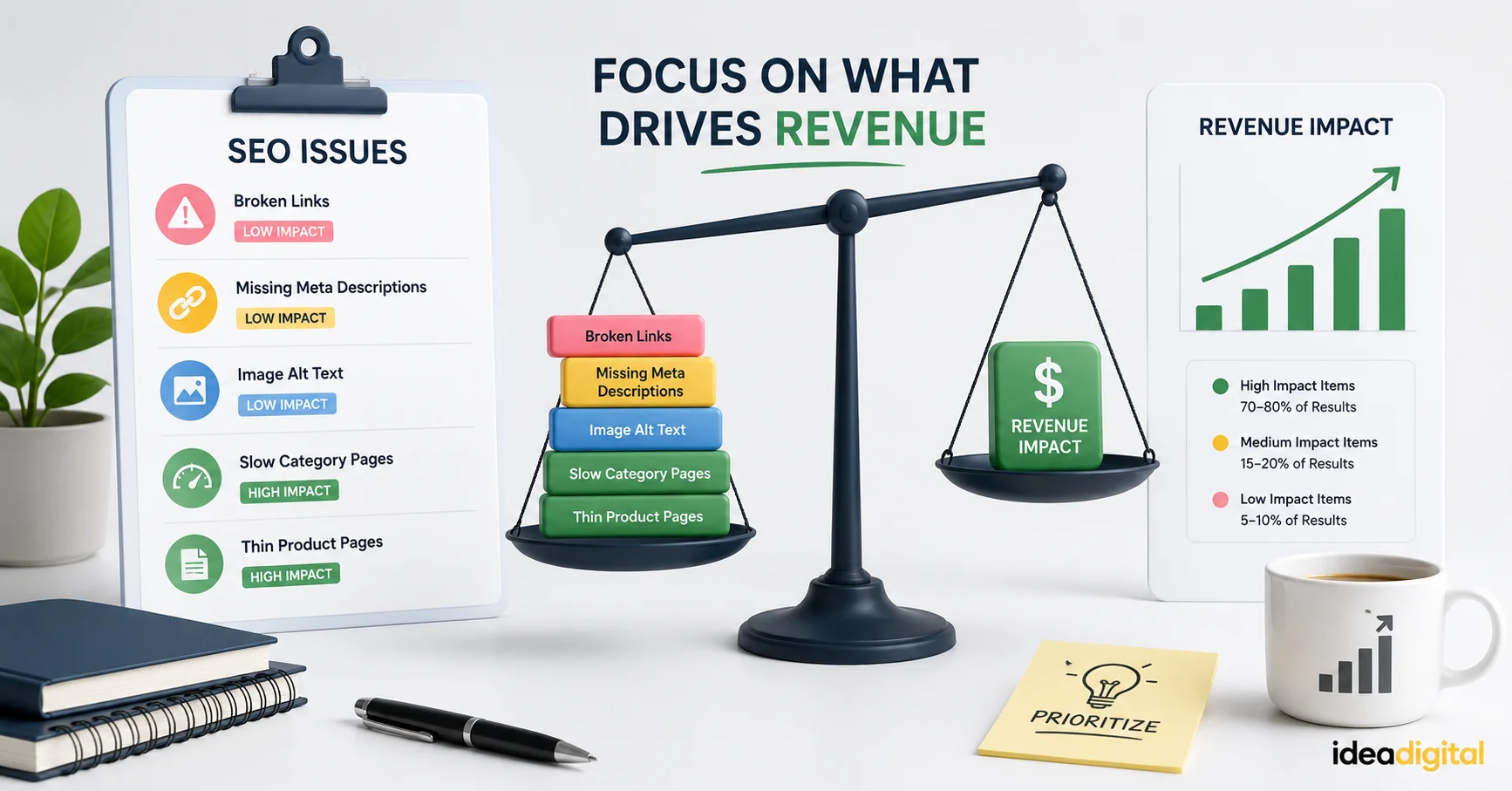
Mistake 3: Fixing Issues Without Prioritizing by Revenue Impact
An eCommerce site audit can surface hundreds of findings. The mistake is treating them as a flat list and working through them in order. The priority should always be commercial impact. An issue affecting 50 high-traffic category pages ranks above an issue affecting 200 low-traffic tag pages regardless of technical severity. Before beginning implementation, map each finding to the pages it affects and the revenue at stake on those pages. That ranking determines the order of work.
Mistake 4: Running the Audit Once Before Launch and Not Revisiting
An eCommerce site changes constantly. Products are added. Promotional landing pages are created and then forgotten. Plugins are updated and occasionally break canonical configurations or sitemap settings. The audit is not a launch checklist. It is a recurring process. At minimum, a focused re-audit of the highest-risk categories (indexation, canonical structure, Core Web Vitals) should happen quarterly, with a full site audit annually.
FAQ’s
How long does an eCommerce SEO audit take?
For a small to mid-size eCommerce store with 200 to 2,000 products, a thorough audit covering all seven sections typically takes five to ten business days. Larger catalogs with complex faceted navigation, multiple storefronts, or international configurations can take two to three weeks. The crawl itself is fast. The analysis, prioritization, and documentation of findings takes most of the time. An audit that delivers in 24 hours is almost certainly automated output with minimal human interpretation.
What is the most common issue found in eCommerce SEO audits?
Duplicate content caused by product variant URLs and faceted navigation parameters is the single most common finding across eCommerce audits we run for US businesses. It appears in some form on nearly every eCommerce site that has not explicitly addressed it. The second most common is thin or missing category page content. The third is out-of-stock product pages returning 404 errors rather than staying live with redirects or alternative product recommendations.
Should I fix audit findings before starting an SEO campaign or simultaneously?
Address the highest-priority technical issues, specifically indexation problems, canonical failures, and critical crawl budget waste, before investing in content and link building. Building links to pages that are not properly indexed or that are splitting authority with duplicate variants produces significantly less result than the same investment on a clean foundation. The implementation window for foundational technical fixes is typically four to eight weeks, after which content and authority building can run in parallel with ongoing technical maintenance.
Does an eCommerce SEO audit differ for Shopify versus WooCommerce?
The categories covered are the same, but the specific issues found differ by platform. Shopify has structural duplicate content caused by its fixed /products/ and /collections/ URL paths, which create two accessible versions of every product URL. WooCommerce duplicate content is usually caused by plugin conflicts, parameter-based URLs from filters, and WordPress archive behavior. Both platforms require canonical tag management as a baseline. WooCommerce typically has more configurable solutions but also more ways for configurations to go wrong.
Conclusion
An eCommerce SEO audit checklist is the difference between running a campaign on a solid foundation and running one on a site that is working against itself. The stores that compound organic revenue year over year are the ones that know exactly what their site’s technical state is, fix the structural issues that suppress everything above them, and then invest in content and authority that compounds without interference.
If you are ready to work with a team that measures success the same way you do, by revenue not rankings, request your custom growth proposal today. We will audit your site, show you the exact findings, and walk you through the prioritized plan for turning those findings into organic growth. Request your proposal here.